

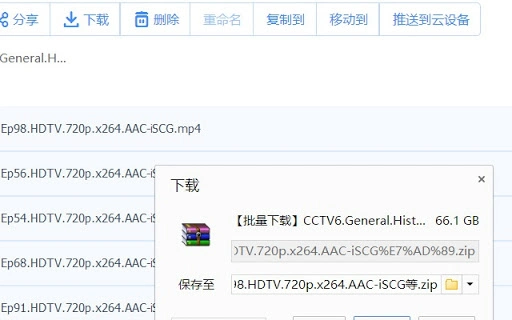
Description
Baidu Netdisk Fast Download Tool
Overview
The Baidu Netdisk Fast Download Tool is a desktop utility designed to enhance file transfer capabilities from Baidu Netdisk, a popular cloud storage service in China. It targets users who frequently download large files from Baidu Cloud and require faster, more reliable access. The tool functions as a browser extension, integrating directly with Chrome to bypass download limitations often imposed by the official platform. Its primary purpose is to streamline the download process, reduce wait times, and improve overall efficiency for individuals managing extensive file collections.
Target users include content creators, researchers, students, and professionals who rely on Baidu Cloud for data storage and sharing. The tool is particularly useful in scenarios involving bulk downloads or time-sensitive file retrieval. While the developer has not been publicly identified, the project is open-source and hosted on GitHub, suggesting community-driven development and transparency. Real-world usage includes downloading high-resolution media, software packages, and research datasets without the constraints of standard download speeds.
Key Features & Capabilities
- Unrestricted Download Speeds: Enables faster file transfers by circumventing built-in download throttling on Baidu Netdisk.
- Chrome Browser Integration: Functions as a browser extension compatible with the Chrome ecosystem.
- One-Click Activation: Simplifies the download process with minimal user interaction required.
- Open-Source Codebase: The underlying code is publicly available on GitHub, allowing for independent verification and community contributions.
- Lightweight Design: With a file size of 1.2 MB, the tool maintains low system resource consumption.
These features allow users to initiate downloads without waiting for download queues or bandwidth caps. For example, a researcher downloading a 10 GB dataset can start the transfer immediately after enabling the extension. Similarly, a content creator can retrieve large video files from Baidu Cloud without delays. The open-source nature supports transparency and security audits, although users should exercise caution when installing third-party extensions.
User Interface, Workflow & Performance
The tool operates primarily through the Chrome browser interface, with minimal on-screen presence. Users interact with it via a browser extension icon, which activates upon visiting a Baidu Netdisk file page. The workflow is streamlined: once enabled, the extension detects downloadable files and provides an option to initiate fast downloads. Navigation is straightforward, requiring no complex setup or configuration.
Performance observations are based on general software behavior patterns. The tool does not appear to consume significant CPU or RAM resources during operation, consistent with its lightweight design. Stability is expected to be high due to its simple execution model, though actual behavior may vary depending on the user’s system and network conditions. The developer did not specify resource usage details, so performance may differ across environments. Users should monitor system performance during extended use.
Compatibility & System Requirements
The Baidu Netdisk Fast Download Tool is compatible with Windows, Mac, and Linux operating systems. It functions as a Chrome extension, meaning it requires the Chrome browser to operate. The installation size is 1.2 MB, indicating a compact footprint. However, exact system requirements were not listed by the developer. This includes details about minimum processor speed, RAM, or disk space.
Platform compatibility information is limited to the supported OS types. Users should ensure their system runs a recent version of Chrome to maintain functionality. The tool does not appear to require administrative privileges for installation. While it is designed for desktop use, it relies on browser-based execution, which may impact performance on older or low-resource devices. The developer did not provide additional system requirements.
Pros and Cons
Pros
- Enables rapid downloads from Baidu Netdisk without throttling
- Open-source and publicly verifiable codebase
- Lightweight with minimal system impact
- Simple one-click interface for fast access
- Available for Windows, Mac, and Linux
Cons
- Requires Chrome browser for operation
- Functionality depends on third-party browser extension support
- Developer identity not publicly disclosed
- May be affected by changes to Baidu Netdisk’s interface or API
- Security implications of installing third-party extensions
FAQ Section
Is the Baidu Netdisk Fast Download Tool compatible with all browsers?
The tool is designed specifically for Chrome. It may not function properly on other browsers due to its reliance on Chrome’s extension architecture.
Is the tool safe to use?
As an open-source extension, the code is publicly available for review. However, users should only install it from trusted sources and review the permissions it requests before enabling.
How often is the tool updated?
Update frequency is not specified by the developer. Users should monitor the GitHub repository for new releases or changes.
Does the tool require a license?
The tool is available for free and does not require a license key or subscription.
Can I use the tool offline?
The tool requires an active internet connection and access to Baidu Netdisk to function. It cannot operate in offline mode.
Final Thoughts + CTA
The Baidu Netdisk Fast Download Tool offers a practical solution for users seeking to overcome download limitations on Baidu Cloud. Its lightweight design, open-source foundation, and cross-platform support make it a compelling option for professionals and individuals managing large file transfers. While it depends on Chrome and lacks official developer transparency, its functionality remains effective for its intended purpose. Users who frequently download large files from Baidu Netdisk will benefit most from its speed and simplicity.
Download Baidu Netdisk Fast Download Tool now
Guides & Tutorials for 百度云大文件下载破解 Extension for Chrome
How to install 百度云大文件下载破解 Extension for Chrome
- Click the Preview / Download button above.
- Once redirected, accept the terms and click Install.
- Wait for the 百度云大文件下载破解 Extension for Chrome download to finish on your device.
How to use 百度云大文件下载破解 Extension for Chrome
This software is primarily used for its core features described above. Open the app after installation to explore its capabilities.
User Reviews for 百度云大文件下载破解 Extension for Chrome 0
No reviews found





